Interactive Golf Course Technology
Interactive Golf Course Maps: A Complete Digital Guide for Golf Clubs
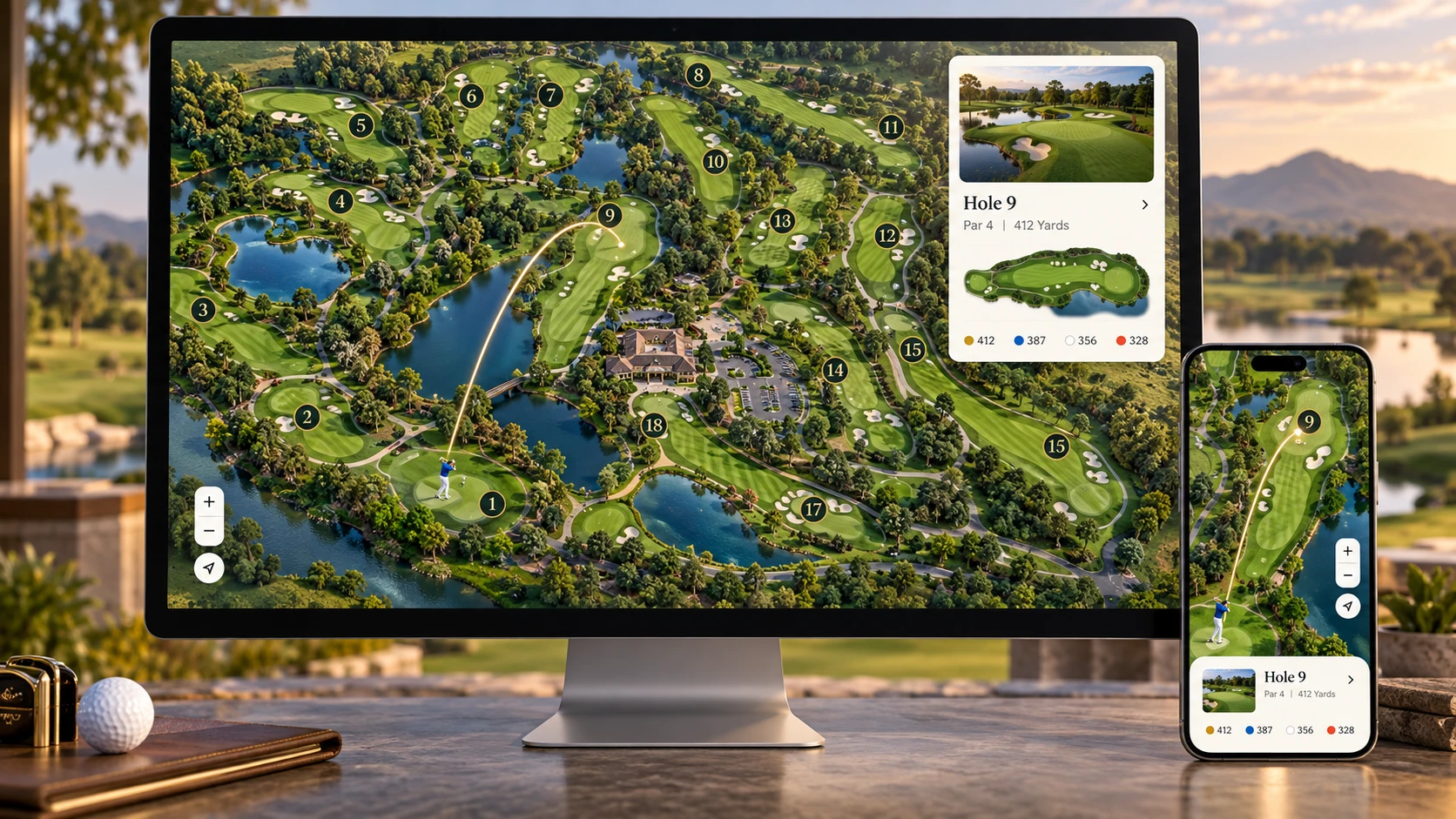
An interactive golf course map turns a static course image into a mobile-friendly digital guide with clickable holes, tee yardages, animated shot tracers, flyovers, hazards, facilities, media and direct booking actions.
Quick answer
What Is an Interactive Golf Course Map?
An interactive golf course map is a digital, clickable representation of a golf course. Instead of only displaying a flat JPG or PDF, it allows golfers to select a hole and view useful information such as par, stroke index, tee distances, playing strategy, hazards, photographs, flyover video and booking options.
The map can represent a single hole, a 9-hole course, a 12-hole course or a complete 18-hole layout. A well-built version uses scalable vector graphics (SVG), so hole markers, route lines and course details stay sharp as visitors zoom on desktop, tablet or mobile.
The experience
How Does an Interactive Golf Map Work?
The illustrated course artwork forms the visual base. Separate interactive SVG regions are then assigned stable identifiers for holes, routes, facilities and hazards. When a visitor selects a hole number or taps the corresponding area, the interface can focus the camera on that hole and open its information card.
Select a hole
The golfer taps a hole badge, course area or number in the navigation rail.
Focus the course camera
The map smoothly pans and zooms to keep the selected hole clear and recognizable.
View hole information
A responsive card shows par, yardages, index, strategy, media and relevant actions.
Play the cinematic guide
An optional golfer swing begins the ball animation, route tracer and live yard counter.
Feature set
Essential Features of a Premium Interactive Golf Course Map
Clickable golf holes
Each hole can open its own information card, helping visitors understand which part of the course they are viewing.
Tee yardages and scorecard data
Display black, blue, white, gold or red tee distances alongside par and stroke index using course-approved information.
Animated shot tracer
A curved tee-to-green route, animated ball and live distance counter create a clear cinematic hole overview.
Golf-hole flyover
A smooth camera movement can frame the complete hole before the shot sequence begins, with reduced-motion support where required.
Hazards and landing zones
Markers can identify water carries, bunkers, out-of-bounds areas, preferred landing zones and recommended layup positions.
Facility markers
Show the clubhouse, pro shop, restaurant, parking, practice range, putting green, restrooms and halfway house.
Photos and video
Optional tee-box, fairway and green photographs can appear in the hole card, while flyover video opens in a responsive on-page modal.
Booking integration
Calls to action can connect the guide to the club’s existing tee-time page, membership enquiry form or golf package.
Responsive map controls
Touch-friendly pan, zoom, reset and fullscreen controls make the course easier to explore across screen sizes.
Business value
Benefits for Golf Clubs, Resorts and Players
For golf-course operators
- Presents the complete course in a modern branded format.
- Connects course discovery to an existing booking journey.
- Organizes hole information, facilities and media in one interface.
- Provides reusable content for the website, sales presentations and social media.
- Can reduce confusion about the course layout before arrival.
For golfers
- Offers a clear overview of every hole before a round.
- Makes tee distances, hazards and facilities easier to locate.
- Supports quick exploration without downloading a separate app.
- Works with touch controls on a phone or tablet.
- Provides direct access to relevant booking or course-detail pages.
Comparison
Static Golf Map vs. Interactive Golf Map
| Capability | Static image or PDF | Interactive SVG map |
|---|---|---|
| Course overview | Yes | Yes, with selectable regions |
| Sharp zooming | Depends on image resolution | Vector overlays remain crisp |
| Hole information | Must fit on the artwork | Opens on demand |
| Shot tracer or flyover | No | Optional |
| Photos and video | No | Optional per hole |
| Booking actions | Usually one general link | Course or hole-specific actions |
| Mobile interaction | Pinch and zoom only | Tap, pan, zoom and fullscreen |
From reference to launch
How a Custom Golf Map Project Is Created
- Collect course references.The club supplies satellite references, an existing map, scorecard, branding, photographs and approved course information.
- Design the course artwork.The layout is illustrated with fairways, greens, tee boxes, bunkers, water, paths, landscaping and facilities.
- Prepare interactive SVG layers.Each hole, route, badge, hazard and facility receives a stable identifier used by the interface.
- Connect hole data and media.Par, index, yardages, descriptions, photographs, videos and links are assigned to the corresponding holes.
- Build responsive interactions.Navigation, zooming, focus behavior, detail cards, animation and mobile fullscreen views are implemented.
- Test and publish.The final map is checked across current desktop and mobile browsers, then embedded in the existing website or delivered as a standalone page.
Project checklist
What Information Is Needed to Build the Map?
Course references
Satellite location, existing map, architectural plan, sketch or high-resolution aerial image.
Official scorecard
Hole numbers, par, stroke index and approved distances for every available tee.
Course branding
Logo, brand colors, typography preferences and website design references.
Hole content
Hole names, playing descriptions, strategy notes, hazard information and facility details.
Course media
Tee, fairway and green photographs plus flyover or drone-video links where available.
Website links
Website URL, tee-time page, contact page and any hole-specific destination links.
Accuracy note: Yardages and official course details should always be supplied or approved by the golf club. The interactive map is a digital presentation tool and should not replace an officially surveyed yardage system unless survey-grade data is provided.
Answers for buyers
Frequently Asked Questions
Can you use our existing golf course map?
Yes. An existing PDF, image, SVG, aerial reference or printed course plan can be reviewed. Depending on its quality and licensing, it may be used as a reference, prepared for interaction or redrawn into a cleaner custom vector map.
Can the map support 9, 12 or 18 holes?
Yes. The navigation and data can be configured to display only the holes that exist. A one-hole demonstration, 9-hole layout, 12-hole layout or full 18-hole course can use the same responsive system.
Will the interactive golf map work on mobile?
Yes. The interface can include touch-friendly panning and zooming, responsive navigation, fullscreen hole details and a video modal designed for smaller screens.
Do we need to replace our tee-time booking system?
No. The map can link to an existing tee-time provider, booking page, enquiry form or membership page. The exact integration depends on the links and capabilities provided by the booking platform.
Can hole details be updated later?
Yes. Hole descriptions, distances, links, media and visibility controls can be stored in a structured data object or connected to an editable management system, depending on the project scope.
Which files can be delivered?
Available deliverables can include PNG or JPG artwork, editable SVG or Adobe Illustrator artwork, website-ready HTML/CSS/JavaScript, a standalone page, or an embed prepared for WordPress and Elementor.
Is the shot tracer based on real ball-tracking data?
Not by default. The standard shot tracer is a designed visual route used to explain the intended direction of play. Real performance or tracking data requires a separate compatible data source and integration.
How do we start a project?
Send the course location, existing map or plan, official scorecard, branding, requested features, media and website information. The scope can then be confirmed before design and development begin.
Your course, made interactive
Ready to Upgrade Your Golf Course Map?
Turn your static course image into a branded digital guide that visitors can explore on desktop, tablet and mobile.